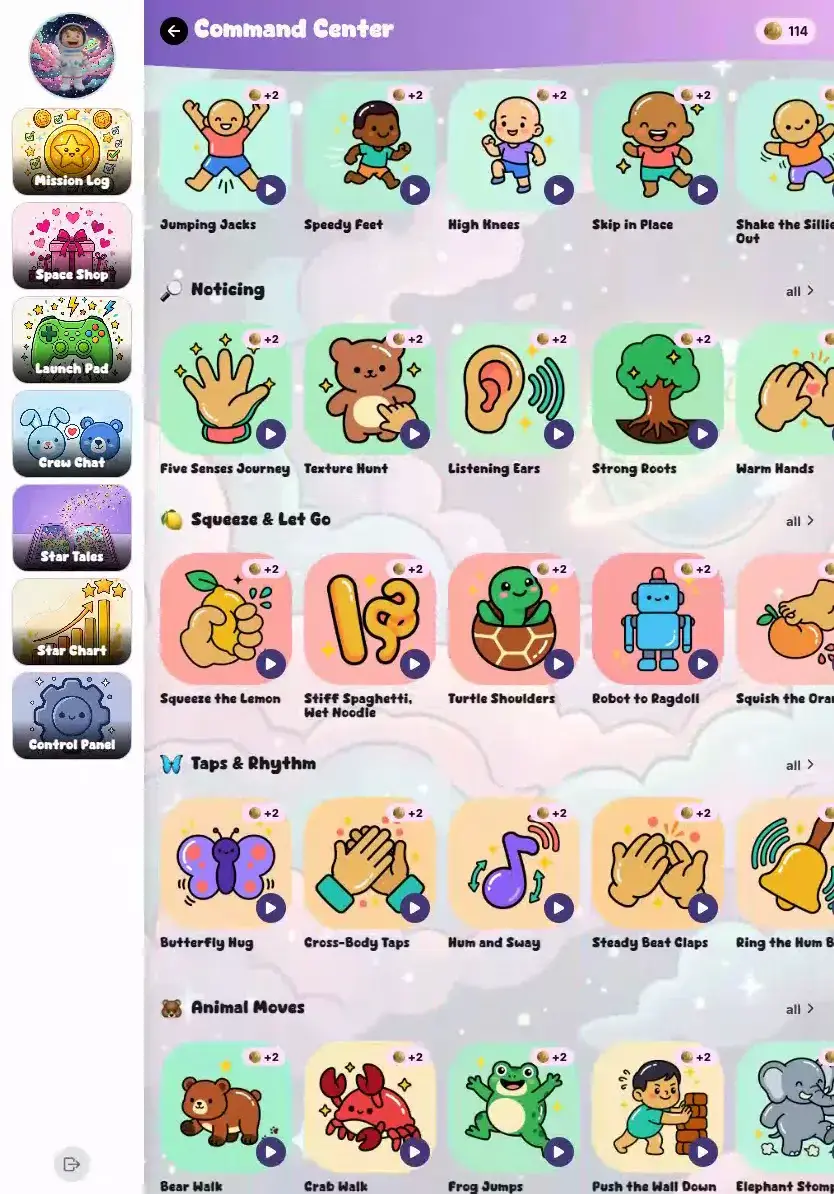
Short sessions their companion leads them through on screen — stretch, jump, breathe, or shake a frustrated mood off. Anything that needs floor space has a seated version waiting. And KudoKids interrupts screen time on its own to make them look away from the screen.
Most movement apps quietly assume a mat, a schedule, and a room to spare. This one assumes none of those, because most evenings don't have them.
Short Enough to Actually Do
Sessions are short on purpose. A child can fit one between two other things and still get the point of it — nothing to block out on the evening, nothing to get changed for.
Living-Room Sized
Most of it works in the gap between a couch and a coffee table. Stretches, breathing, squeeze-and-release, silly mouth moves — none of that needs a room to itself.
A Seated Version of Anything Bigger
Everything that does need floor space comes with a seated, low-impact alternative. A crowded living room, a hotel room, a kid who doesn't feel like jumping today — there's still something to do.
EXERCISES
Some Rounds Happen Standing Up
Moving and breathing both — and the app helps them work out which one they need right now. Coins come from doing it, never from doing it well.
What a Round Can Be
Read moreCloseStar jumps and animal moves, belly breaths paced by a circle, squeeze-and-release — and the wheel they spin when they can't pick.
Moving
Stretches, animal moves, star jumps, lily-pad hops — the kind that leaves a kid a little out of breath. Silly mouth moves too, which the five-year-olds will do all day.
Breathing
Belly breaths and square breathing, paced by a circle on screen that grows as they breathe in and shrinks as they breathe out. Nothing to read, nothing to keep up with.
Settling
Squeeze-and-release, one muscle at a time. Or a noticing round — what they can see, hear, and feel from right where they're standing. For the moments a body needs to come down, not go up.
Picking One
It opens by asking how their body feels — silly, sleepy, frustrated — and suggests something to match. Or they spin the wheel and take what it lands on. Or they browse and choose for themselves.
How a Session Actually Runs
Read moreCloseOne step at a time with a countdown beside it, and a circle that expands and contracts at the pace of the breath.
Steps come up one at a time, each with a countdown running beside it, so a child always knows what they’re doing and how much of it is left. Breathing steps put a circle on screen that expands and contracts at the pace of the breath. Moving steps show how many to do. Their companion stays on screen the whole way through.
Two Gates Before Anyone Starts Jumping
Read moreCloseAnything needing floor space makes your child clear it first; anything needing you waits in your inbox until you answer.
A kid alone with a tablet will absolutely try a star jump next to a lamp, or head out the back door because the screen said “outside.” Both of those stop first. These aren’t fine print — they’re the reason this is safe to hand a seven-year-old in an unsupervised half hour.
Clear a Space First
Anything that needs room stops and asks your child to look around and clear a space before it will start. Every one of those has the seated version waiting one tap away — so a small room still leaves them something to do rather than nothing.
Ask a Grown-Up
Anything that needs supervision waits for you, and every outdoor exercise sets that gate. It files a real request into your inbox — the same inbox their other approvals land in — and it sits there until you answer.
Showing Up Is the Whole Bar
Read moreCloseCoins for participation only — not accuracy, not how long they held it — with the rate and the daily cap yours to set.
Coins are for participation. Not for accuracy, not for how long they held it, not for how it looked — there is no score anywhere in this. A daily cap keeps it from turning into a coin faucet, and both the cap and the coins per session are yours to set. A kid who is bad at star jumps earns exactly what a kid who is good at them earns.
Nothing Is Watching Them Move
Worth saying plainly, because a parent reading about a movement feature will assume otherwise: there is no form check and no movement tracking in KudoKids. Nothing measures how a stretch looked, nothing scores it, and nothing is captured while they move — the app was never built to. A microphone game and a camera mirror exist as extras, and both are off by default. The mirror is exactly that: a mirror your child can glance at, keeping nothing. The microphone extra only reads how loud a room is, and it isn’t part of the web app.
Exercises are on by default — one switch turns them off
Approve them per child, like anything else in the app
Set the coins per session and the daily cap
Microphone game off by default
Camera mirror off by default
Outdoor sessions ask you first, through your inbox
Exercises are for practice and play, not medical care or therapy.
LOOK-AWAY BREAKS
A Screen-Time App That Makes Them Look Away From the Screen
KudoKids stops the screen on its own — long enough to get their eyes onto something across the room and their body out of the chair — then hands it back.
Partway through screen time, the app interrupts itself. Your child is asked to look at something far off, stretch out, and shake the stillness off before the screen comes back. Nobody has to remember to do it, and you don’t have to be the person who says it. That is the part that makes it stick: the reminder comes from the tablet, not from you, so it isn’t a fight.
Breaks are already running before you touch a setting — they’re on out of the box. How often they arrive and how long they last are yours to set, per child, in Settings → Kids Access.
Why the Break Arrives When It Does
Read moreCloseThe eye-care rule about looking far away, and why a younger child gets pulled off the screen sooner.
It follows the eye-care advice most of us have heard from an optometrist — that eyes staring at something close need to go find something far away on a regular rhythm — and pediatric guidance that the younger the child, the sooner they need to stop. So younger kids get pulled away more often, and the break stretches out a little as a child’s attention span grows into it.
If They Peek, the Break Notices
During the look-away step, the device can notice that your child is still staring at the screen and answer with a playful “no peeking!” — about what a grown-up in the room would have said.
Here is exactly what that involves, because “the device can notice” deserves the whole answer. It uses face detection that runs on the device itself. Each look is checked in the moment and is gone immediately after — nothing is stored, nothing is logged, and nothing is sent anywhere. There is no recording, and no image for anyone to go looking for later.
And it changes nothing else. It can’t pause the break, hold a step, or move a single Kudo Coin. A child who peeks the whole way through finishes the break with exactly what a child who looked away gets. It is a reaction and nothing more.
It comes switched on, and you can turn it off for any child. It is separate from the exercise camera mirror above — that one stays off until you switch it on.
THE PAYOFF
The Minutes Add Up Somewhere They Can See
Time spent moving is counted and kept, so a child can watch their own minutes climb rather than take our word for it. Families can turn that into a friendly board — how everyone at home is doing, and how their friends are doing — which for some kids is the entire reason they show up.
And for the kids it doesn’t help, leaderboards come off per child in Friends Control. Some children move more when someone else is watching the number. Some move less. You know which one you have.
OFF THE APP
TV, Tablet, and Gaming Time — Priced in Coins
The screen time that matters most isn’t inside KudoKids — it’s the TV, the tablet, the console. So the app lets you put a coin price on each of those, by the minute, and your child banks minutes with the coins they’ve earned. The countdown runs where they can see it, and unused minutes stay banked for next time. It works the other way too: set up reading or instrument practice as time that earns coins back, with a daily cap you choose.
Siblings can even share a session. With your opt-in, one child starts a shared countdown for movie night and each kid pays for their own seat from their own bank — a child whose banked minutes don’t cover it confirms the coin spend themselves before it starts, and if the session ends early, everyone’s unused minutes go back where they came from. No pooling, no free rides, no arguments about whose turn paid.
Built With Practitioner Input
KudoKids is shaped by working with child-development experts.
KudoKids movement and screen-break features are for everyday practice and play. They are not medical care, therapy, or vision care, and are not a substitute for advice from a qualified professional.
Give Their Eyes and Their Body a Break
Short movement and breathing sessions that fit the room you already have — and screen time that stops on its own to make them look up.