An app the whole family can see into. Routines, rewards, and safety rails come ready out of the box, shaped with child-development experts, and yours to adjust as your family grows. Open it in the morning and ninety seconds tells you what your kids are earning, playing, and learning.
Everything you need to see, approve, and understand — organized and actionable.
Manage Your Whole Family From One Screen
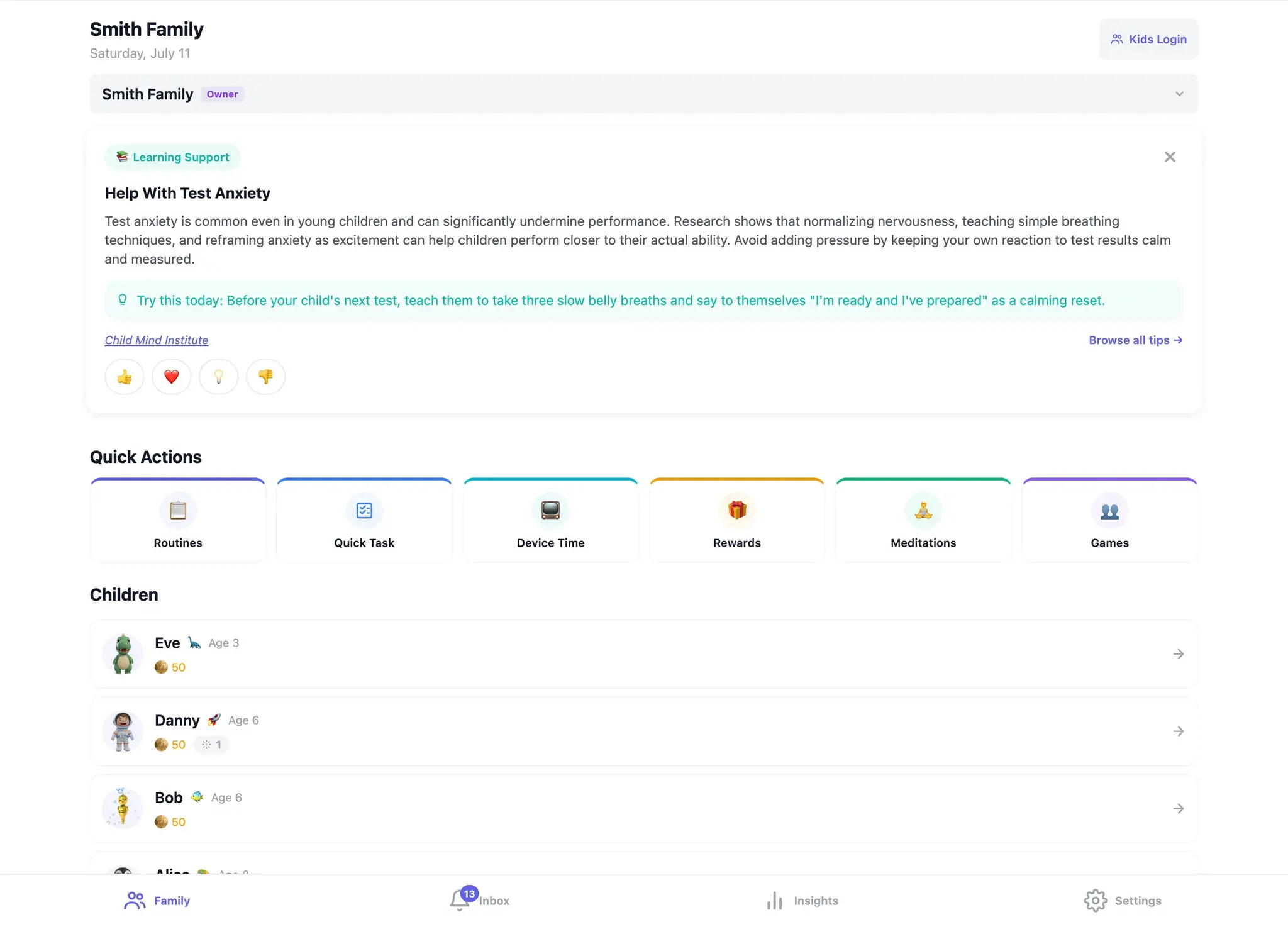
Whether you have one child or five, the Family tab shows every child's status, stats, and latest activity in compact rows. No digging through menus.
Approve Requests in Seconds
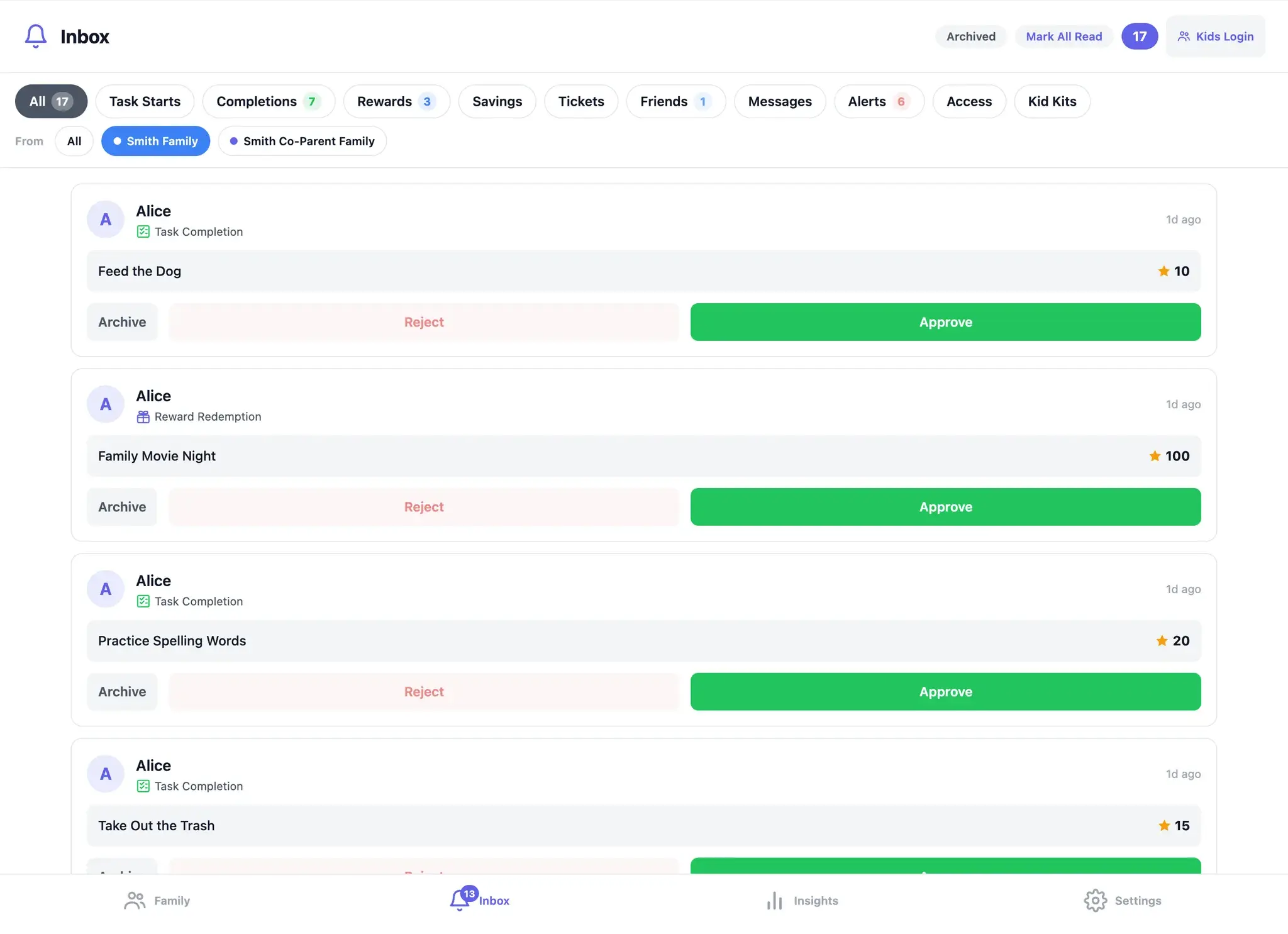
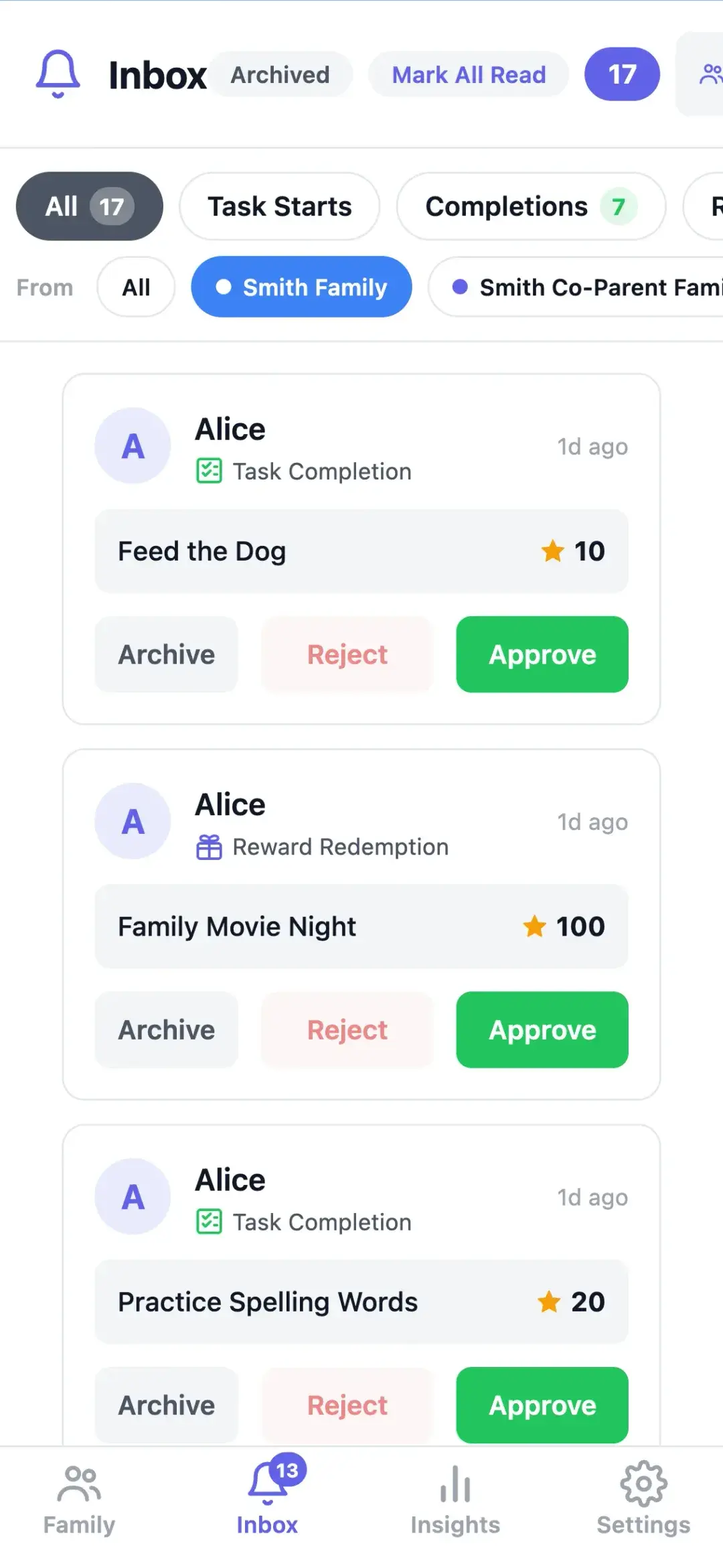
The Inbox collects every pending action in one place — task completions, reward redemptions, savings withdrawals, friend requests, and more. Filter by type with a single tap, auto-approve with one more.
Spot the Pattern Before You Need to Worry
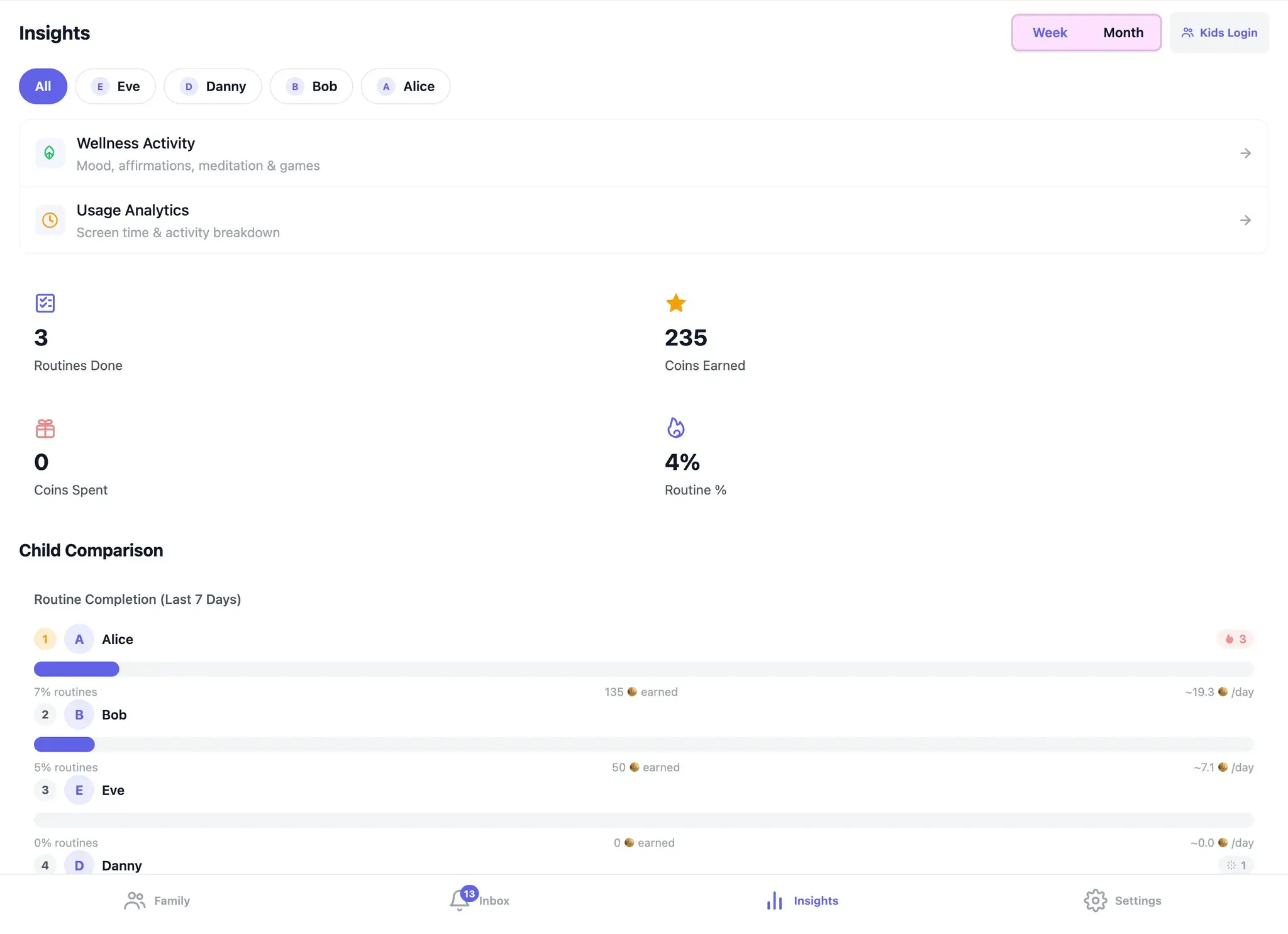
The Insights tab surfaces what actually changed this week: mood check-ins per child, streaks, task completion rates, and earning vs. spending. Switch between Week and Month, or filter to one kid at a time.
A 90-Second Morning Coffee Check
Read moreCloseThree kids, three approvals, and the one check-in worth noticing — start to finish before the coffee cools.
It’s 7:15 AM. Coffee in one hand, phone in the other. Three kids: Emma (10, 12-day streak), Jake (7, 3-day streak), and Lily (4, streak broken yesterday).
The Family tab tells you everything in one glance. Emma has 2 pending tasks from last night (homework and journal). Jake has a reward request: Movie Night Pick (60 Kudo Coins). Lily has no pending items, but her mood check-in from yesterday came back sad.
Tap the Inbox. Approve Emma’s homework — one tap. Approve her journal — one tap. Approve Jake’s Movie Night Pick — one tap, 60 Kudo Coins deducted. Three approvals in about ten seconds. (Or select all three and batch-approve in one.)
Open Lily’s profile. Her check-in came back sad yesterday and the day before. She skipped her afternoon tasks two days in a row. No alarm bells, just something worth noticing — a note to check in with her after school.
The Inbox on a weekday morning: every pending request in one place, one tap each
Your co-parent opens the same dashboard on a tablet at lunch. Dark mode. Same data, same kids, pending items already cleared. They see Lily’s check-ins too. A quick text: “Maybe Lily needs a park day this weekend.”
Total time: ninety seconds. No hovering, no nagging, no micromanaging. You saw what needed seeing and acted on what needed acting on.
Four Tabs, Complete Control
The parent experience is built around four tabs, each designed for a specific purpose.
Inbox: task completions and reward requests, approved in one tap
What Lives in Each Tab
Read moreCloseFamily, Inbox, Insights, and Settings — what each one holds, and the real screens they open on.
1
Family
Your home base. Today's date, a quick action row (Routines, Quick Task, Device Time, Rewards, and more), and a card for each child showing their name, age, streak, and Kudo Coin balance. Tap any child to open their detailed dashboard.
2
Inbox
Every pending action in one place. Filter by Completions, Rewards, Savings withdrawals, Friend requests, Messages, Alerts, and more. Each item shows the child, what they're requesting, and the Kudo Coin value. Approve or reject one-by-one, or select-all and batch-approve.
3
Insights
What actually happened this week, kid by kid. Toggle between Week and Month and filter to one child or the whole family. See task completion rates, coins earned and spent, streak history, child comparisons, and mood notices.
4
Settings
Complete family configuration. Manage Kudo Coin economy rules, vacation mode, family members, children's profiles, security settings, data export, wellness feature toggles, screen-time limits, and game management.
Family: every kid at a glance, plus a daily tip worth reading
Insights: the week's effort, kid by kid
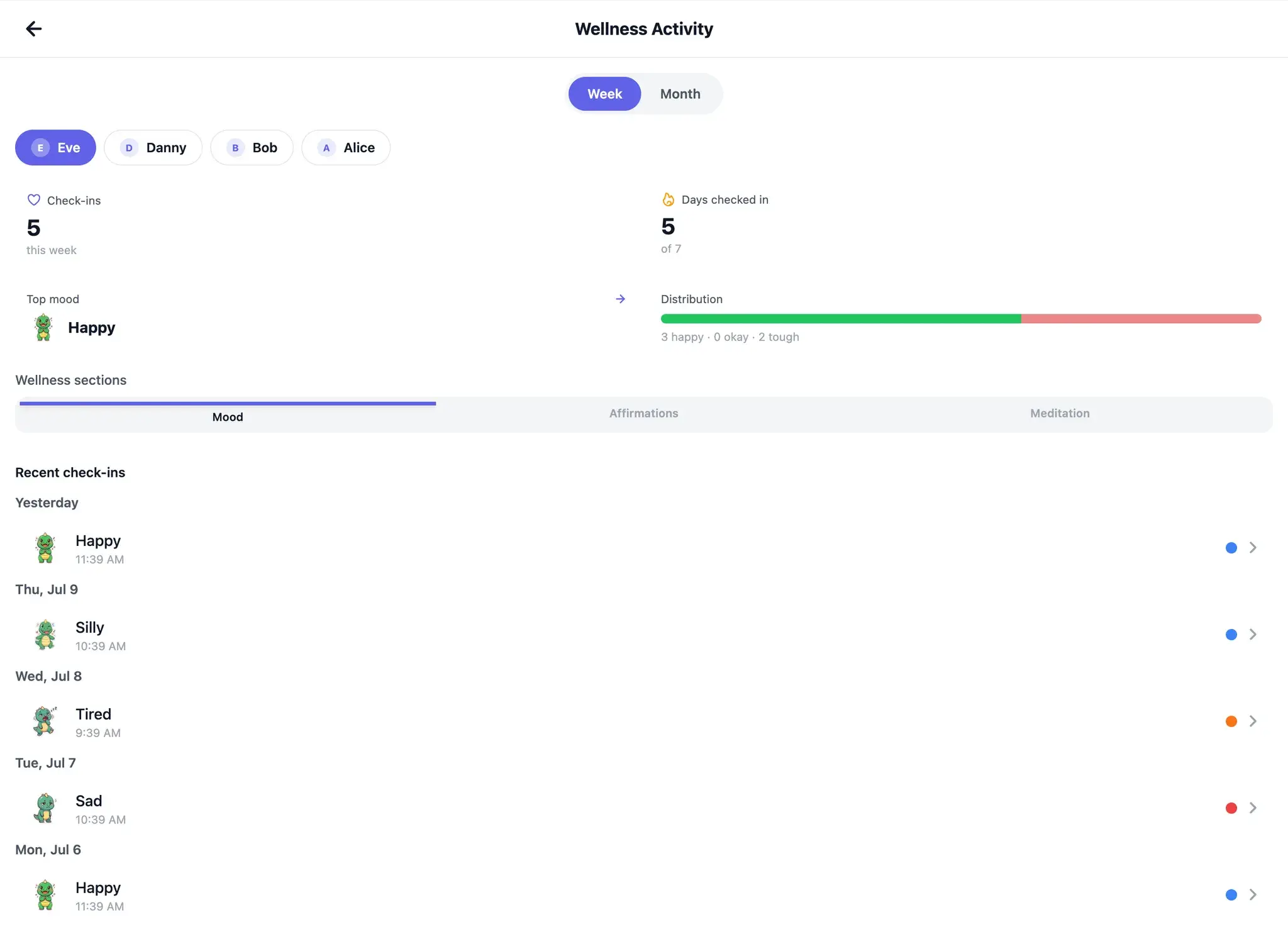
Wellness Activity: the week's check-ins, day by day — reached from Insights
Tell It What You Want. Approve What It Drafts.
KudoKids AI — a Premium assistant that lives on your dashboard, not your kid's screen.
The setup is the part nobody has time for. With Premium, KudoKids AI does it with you: describe what you want in plain language — “a morning routine for my 6-year-old with teeth-brushing and bed-making, 5 coins each” — dictate it, or snap a photo of the paper chore chart on your fridge. It comes back as a preview: every task, routine, and reward is a card you can edit, uncheck, or approve. Nothing changes until you tap Apply, and every applied change has an Undo button.
It answers how-do-I questions too — “How do approvals work?” — straight from the official KudoKids guides. And it stays in its lane: it won’t give parenting or medical advice, and it will tell you when a question is better for a human at support.
What You Can Ask It
Read moreCloseSet up routines, tasks, and rewards; import a paper chore chart from a photo; ask how anything works.
“Create a bedtime routine for Leo” — typed or dictated, it drafts the routine for your approval
“Add a reward: movie night for 100 coins” — rewards and quick tasks, set up in one message
Snap your paper chore chart — it reads the photo and proposes the chores it found, usually as a routine per child
Suggestions you don't want stay unchecked — only what you approve is applied, and serious items, like removing something or turning a feature off, are flagged in red
After you apply, a receipt shows exactly what was created — and Undo walks the batch back (if coins were already spent, it reverses what it can and tells you)
It can make mistakes — which is why you review every suggestion before anything is applied
For You. Never for Them.
KudoKids AI exists only in parent mode — no child can ever talk to it. Your chats are never saved: closing the assistant clears the conversation, and only the changes you approve are kept. Your children’s profile names are swapped for anonymous placeholders in the text we send, and their ages, coin balances, and activity are never included. A chore-chart photo you choose to send goes as-is, so it may show a child’s name or face; it is read once to make its proposal, then discarded — never stored. Dictation is recognized on your own device, so no audio ever leaves your phone. KudoKids AI is included with Premium (trials and lifetime passes count).
Designed for How Parents Actually Work
Per-Child Dashboard
Read moreCloseTap one child: their week's check-ins, coin ledger, task status, and savings goals on a single page.
Tap any child to see their full picture: the week’s mood check-ins, Kudo Coin balance and recent transactions, active tasks and their status, savings goals and progress, plus an alerts panel that surfaces mood notices and pending approvals. Quick-action buttons let you add tasks, adjust rewards, or view full history without leaving the page.
The week's mood check-ins at a glance
Kudo Coin balance and full transaction ledger
Active task status
Savings goals progress
Mood and approval alerts
Built for Two Parents
Read moreCloseYour co-parent gets their own login — and an approval either of you makes disappears from both inboxes.
Invite a co-parent or guardian from the Family Management screen — they get their own login, see the same dashboard, the same pending approvals, the same mood check-ins. When one of you approves Emma’s homework, it’s gone from both inboxes. No more “did you handle this?” texts.
Adapts to Whatever You're Holding
Read moreClosePhone in the pickup line, tablet at the counter, laptop after bedtime — and dark mode if you want it.
Phone in line at school pickup. Tablet at the kitchen counter. Laptop after the kids are in bed. The dashboard adjusts its column count, type sizes, and tap targets to whatever device you’re on — and follows your light/dark system preference (or overrides it, if you prefer).
The same dashboard on a phone, one hand free in the pickup line
The Calendars You Already Juggle, Imported
Read moreCloseSubscribe to the school portal or the team's schedule once — events land on the family calendar, and can even earn coins.
The school portal, the soccer team, your shared Google or Outlook calendar — paste the calendar link once and its events land on the family calendar, re-syncing daily on their own. Pick which kids each calendar applies to, and decide whether showing up earns Kudo Coins (it starts at zero — your call). Your own edits always win: rename an event or change its coin value and later syncs only refresh the timing. The connection is one-way — nothing about your family is ever sent back to the calendar’s source, and the links themselves are stored encrypted and never shown to children.
Nudges That Notice the Good Stuff
Read moreCloseA gentle reminder to catch them being good, and a weekly summary that keeps kids' details out of your email.
Kudos Moments is a scheduled nudge — a few times a week by default, or daily, weekly, or off — asking whether you caught a specific good behavior today, one tap away from a small coin bonus. The notification never names a child, and on days when everyone has already been recognized, it simply stays quiet.
An optional weekly digest rounds up each child’s week — routines done, spending patterns, and growth wins — inside the app. The email reminder is deliberately content-free: no child names, coin counts, or streak numbers ever appear in your inbox, just a note that the summary is ready.
Your Data, on Demand
Read moreCloseOne JSON file with everything — transactions, tasks, check-ins, profiles — from Settings → Data & Privacy.
Export your family’s full data set — transactions, task history, mood check-ins, profiles — as a single JSON file from Settings → Data & Privacy. Keep it for your records or share it with a co-parent. It’s your data; we just hold it for you.
Privacy You Can Actually Verify
KudoKids is COPPA-compliant by design. Every wellness feature — emotion check-ins, meditations, messaging, games, friends — has its own toggle in Family Settings. Turn one off, and KudoKids stops collecting data in that category. There’s even a single switch to pause non-essential data collection across the entire family. Your child’s data is stored with Supabase (our database). Limited operational data flows to Expo (push notifications), Sentry (masked crash reports), and Resend (parent emails) — never sold, never used for ads, never shared with behavioral-profiling vendors or data brokers.
Shaped by working with child-development experts.
Your Family, at a Glance
Four tabs. Every child. Complete clarity. Manage tasks, approvals, and insights without hovering.