KudoKids A brief for educators · Spring 2026
i

The home-side of
what you already
build at school.

KudoKids is a children's digital wellbeing app for ages 3–12. We're building it with educators — and we'd like your read before families see it.

Ages 3–12 Download on the App Store Get it on Google Play
Joseph Yelle, founder  ·  joseph@kudokids.org  ·  kudokids.org/partners/educators
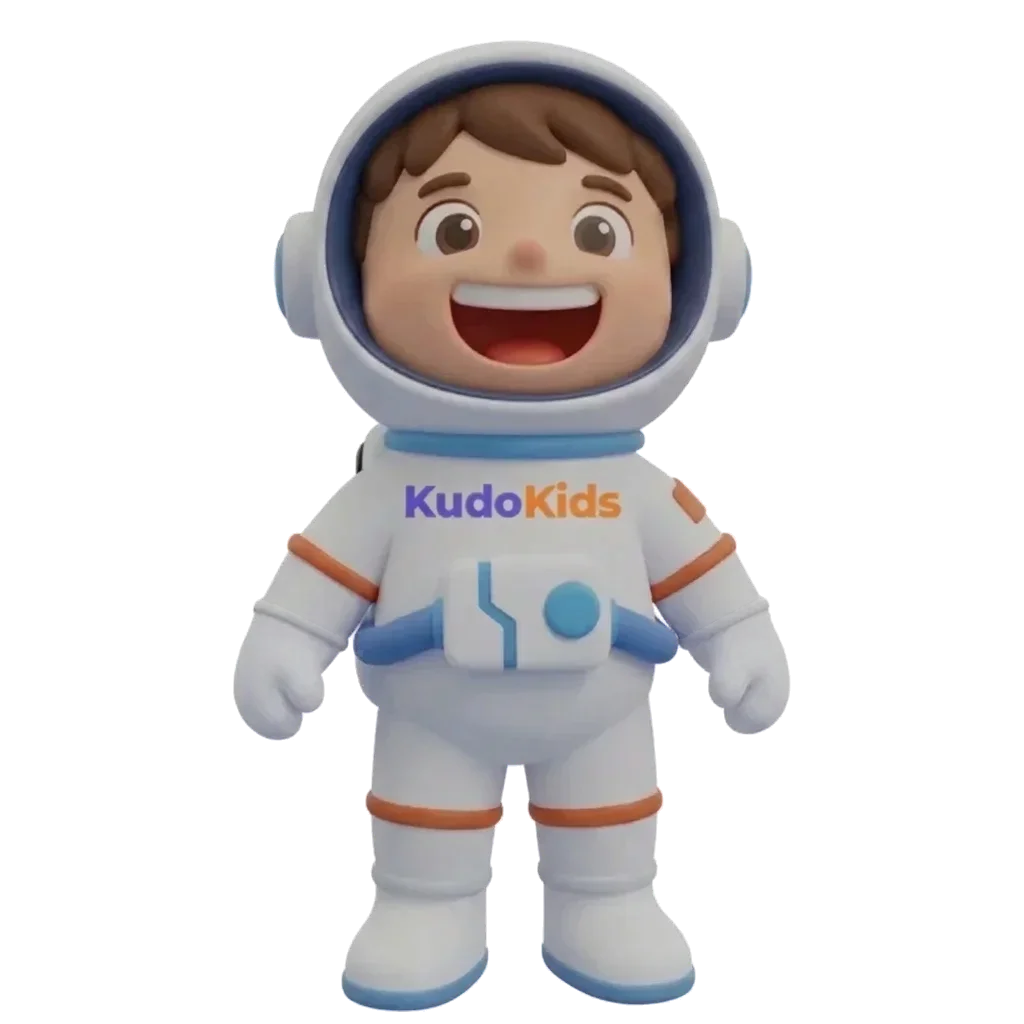
Cosmo, KudoKids' free starter companion
Cosmo · the free companion
§ I What educators keep telling us
02
The gap we keep hearing about

What you build at school doesn't always travel home.

The habits children develop in your classroom — emotional vocabulary, follow-through, executive function — have the most lasting impact when they are reinforced at home. The home–school gap is where that work gets stuck.

  • Skills built at school fragment at home. Emotion words, routine steps, growth-mindset language — kids know them in your room and lose them by Tuesday morning.
  • Parents want to support what you do. They just don't have the structure for it. You can't run the home.
  • Family routines are the lever. Most of the behavioral friction you see at 8 a.m. is yesterday's evening routine that didn't happen.
KudoKids routines surface — the structure parents lack

We'd rather hear "here's what would help the home-school conversation" than "looks great." That's why you're getting this deck before families do. — Why we wrote this for educators

KudoKids · educator brief 02 / 16
§ II What the product actually does
03
The premise

Earn. Spend. Grow.

Kids earn Kudo Coins for completing routines and tasks their parent set up. They spend those coins on screen time, in-app stories, companion customization, games, or real-world rewards. Every interaction touches a developmental domain you already teach — responsibility, numeracy, emotional vocabulary, planning, or social skill.

01 · Routines & tasks
Routines surface with Kudo Coin values

Routines with Coin values. Parents choose auto-approve or review.

02 · Affirmations & meditation
Meditation library — calm, focus, kindness, sleep, cool-off

Calm, focus, kindness, sleep, cool-off — chosen by the parent.

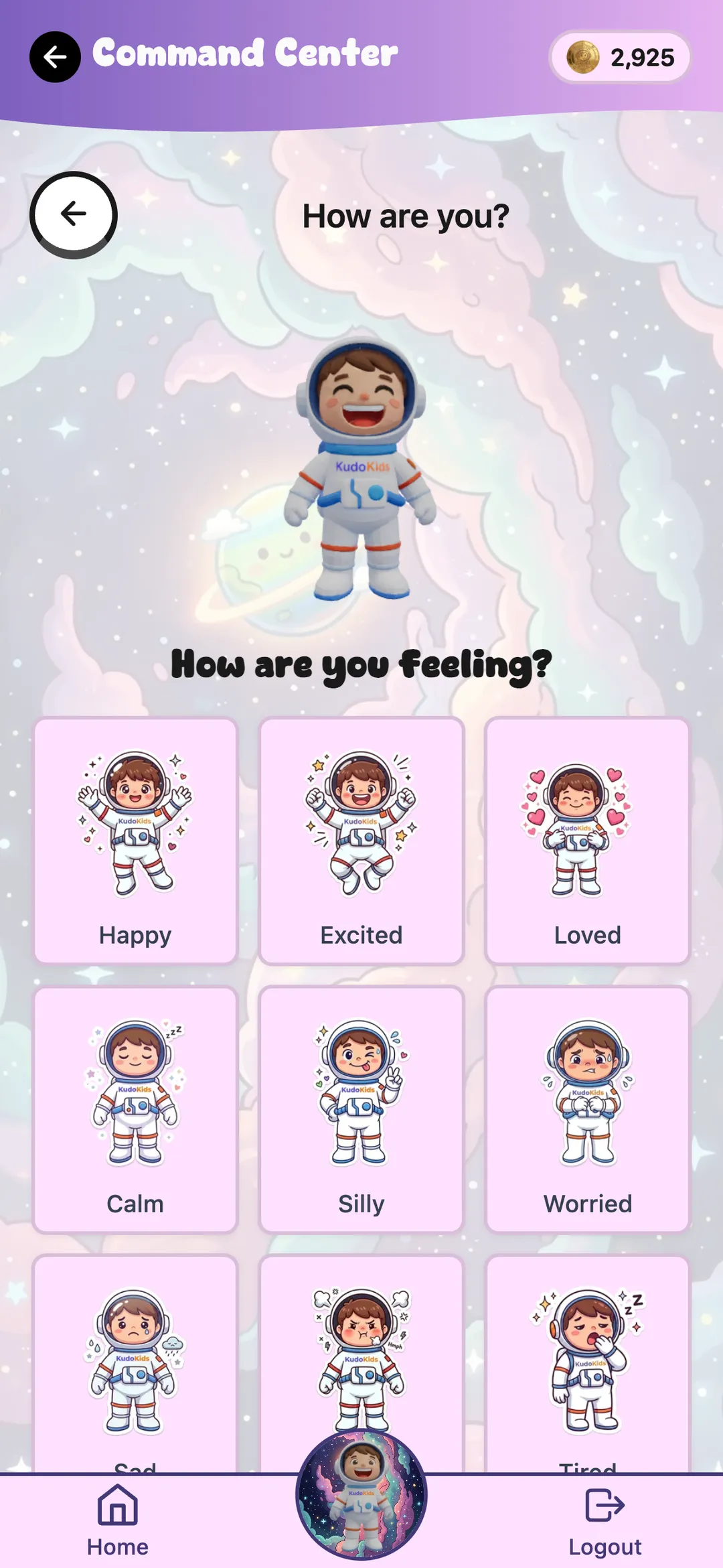
03 · Mood check-ins
Mood check-in surface — child taps a feeling, companion validates

Child names the feeling. Companion offers a next step.

KudoKids child home screen — companion, Kudo Coins balance, routines

Premium ($5.99/mo) unlocks 19 additional companions and customization. Everything else — routines, mood check-ins, affirmations, meditation, 60+ music tracks, sleep sounds, stories, family messaging — is in the free tier.

§ III The home-side bridge
04
The wellness flow

The bridge-to-parent moment.

When a child taps a hard feeling, the companion is not the intervention. The companion is the bridge — the same bridge a good morning meeting builds at school, running on the home side. Every step preserves the child's autonomy.

i
Child picks a mood Happy · excited · loved · worried · scared · angry · sad
happy excited loved worried scared angry sad
ii
Companion validates "Some days are harder than others." Kid earns Kudo Coins for naming the feeling. Cosmo, the free starter companion
iii
"Want to talk?" Pre-set list: school, friends, family, just feel this way, don't want to say.
iv
"Tell a grown-up?" Yes → parent notified. No → no notification. The child controls the bridge.
v
"What now?" Breathing · meditation · music · game · just stay here. Companion offers; child picks.
Design principles
  • The child decides whether the parent is told.
  • The companion routes the feeling — it does not resolve it.
  • No "I'm proud of you" from the companion — validation reflects the child's own achievement back.
  • No evaluator framing. The companion notices, it does not grade.
Where we want your read
Child home — companion, Kudo Coin balance, routines

Whether the emotional vocabulary lines up with what you already teach — and whether the language at each step lands the way we think it does for the ages you work with. This is the slide educators tend to push back on first.

KudoKids · educator brief 04 / 16
§ IV Three positions we hold on purpose
05
Three design choices that aren't accidents

The questions educators keep asking us.

Three places where we made specific calls — and where we'd push back on the assumption a kids' app naturally drifts toward.

01 · AI

No AI in the child experience.

Companions speak pre-recorded, human-vetted lines. Mood check-ins are deterministic flows, not language models. We use AI to build the product fast. We don't ship AI as the thing kids talk to — and we won't for years.

02 · Engagement

Designed to dry up.

Kudo Coins are finite. Games cost coins to play. Time windows can lock features. The win-state is a kid earning a real-world reward, putting the device down, and going outside — not staying in-app longer.

03 · Motivation

Extrinsic, on purpose.

We know extrinsic rewards can crowd out intrinsic motivation for activities a kid already loves. So we use them for the opposite — things kids resist (transitions, brushing teeth, naming hard feelings). The Coin economy fades as routines become mastered.

These are the slides educators usually push back on first. We'd rather have the pushback land here than three months into a launch we have to walk back.

§ V One product, three modes
06
Age adaptation

Three modes. One product. The same kid as they grow.

The UI changes shape based on the child's age — built around the same developmental progression that runs from pre-K through Grade 6. Parents can override the group if a child is ahead, behind, or just different.

Preschooler · 3–5 Child · 6–8 Preteen · 9–12
iTouch targets 80px 60px 48px
iiReading mode 🔊Icons-only · voice on 🔊AaMixed AaText-heavy
iiiSaving incentive "Save 2 days → +10 Coins" "Save a few days → bonus" "Save a week → +50%"
ivScore display Stars Numbers Full analytics
vCompanion size
1.2× (primary navigator)
1.0×
0.9×

The 3–5 mode is the most opinionated. Pre-readers navigate by companion image, not by text — which is why the companion is the biggest tap target on the screen.

§ VI Defaults & the knobs behind them
07
Configurability

Defaults that work. Knobs for when they don't.

Every mechanic is editable per child. We ship sensible defaults so parents aren't overwhelmed — the depth is there when a child needs something different.

Default-on, parent-tunable
  • Routines, tasks, parent approval workflow
  • Affirmations & meditation (focus areas per child)
  • Mood check-ins with bridge-to-parent
  • Kudo Coin economy & save-for-bonus mechanic
  • Streak tracking with vacation mode (pause without losing it)
  • Sleep sounds, music, stories
Default-off, opt-in
  • Demerit system — Coin removal for missed tasks. Off by default; consequence mechanics require practiced delivery.
  • Friend connections — Both parents must approve.
  • Web browsing — Parent-curated allowlist.
  • Activity windows — e.g., games unlock only after the morning routine, or only during a chosen window.

Built for executive-function support. Visual schedules, repeated sub-step checklists, companion-led check-ins, and per-child pacing are designed for families where standard routines don't land.

§ VII The cast
08
Companions

Twenty companions. 3D & AR. One free.

Every child starts with Cosmo. The other 19 unlock with Kudo Coins once a parent has subscribed to Premium.

Each companion has its own voice across the app — routines, affirmations, meditation, story narration, mood check-ins — roughly 1,000 lines of dialogue per companion.

Augmented reality lets kids place the companion into the room, walk around it, and take photos. AR processing stays on-device; no camera frames are transmitted.

Cosmo
Cosmo · free

Reto
Reto
Roto
Roto
Splash
Splash
Cara
Cara
Mari
Mari
Mango
Mango
Corky
Corky
Luca
Luca
Tim
Tim
Zane
Zane
Gummy
Gummy
Stella
Stella
Rex
Rex
Flamer
Flamer
Sparkle
Sparkle
Leslie
Leslie
Gunter
Gunter

Chloe
Chloe
Lyla
Lyla

Space · Ocean · Jungle · Candy · Dino · Princess · Arctic

KudoKids · educator brief 08 / 16
§ VIII What stays free, on purpose
09
Accessibility

The part that matters most is free.

Educators keep telling us the same thing about the digital wellness category: it tends to price out the families that need it most. You should be able to recommend it to every family in your room — no equity concerns.

We expect a meaningful share of households to never subscribe. That's the design.

Meditation library — calm, focus, kindness, sleep, cool-off

Meditation · Mood check-ins · Affirmations · Bridge-to-parent

What Premium adds

19 additional companions · skin / animation / aura unlocks · companion customization. Parent-gated at signup; children never see pricing.

KudoKids · educator brief 09 / 16
§ IX Two homes, one classroom expectation
10
Co-parented kids

Two homes. One classroom expectation.

You already see the students whose home routines reset every weekend. When two parents share custody, the child's profile, companion, Kudo Coin balance, and progress travel with them. Each home defines its own routines. The two parents do not have to see each other's home — they grant that visibility, or not.

what travels Home A Home B
What travels

Companion · Coin balance · unlocks · mood-check-in history · wellness preferences · earned focus areas.

What stays per-home

Routines (each parent defines their own) · approval workflow · optional rewards · calendar.

Privacy default

Parents do not see each other's home by default. Visibility is granted explicitly, both ways, so calendars and routines stay private.

What this does not fix

A co-parent who refuses to use the app. A co-parent in active conflict with the other. We can't solve that, and no app can. But the routine — the thing most co-parented kids reset on for 2–3 days at each transition, and that you see land in your room on Monday morning — doesn't have to be the thing the two of them fight over.

KudoKids · educator brief 10 / 16
§ X Privacy, retention, and what leaves the device
11
Compliance & safety

COPPA-compliant. Apple Kids Category.

  • Verifiable parental consent at every signup; re-consent on policy version changes.
  • No student records. Families enroll directly and voluntarily. KudoKids never receives education records; no DPA is required.
  • Per-feature data toggles — emotion check-ins, affirmations, meditation, games, messaging, social all individually controlled.
  • No behavioral advertising. No ad networks. No child data sold to anyone.
  • Parent data export in JSON; child profile deletion is permanent. Retention caps published in the privacy policy (30 days → 3 years by category).
What gets sent off-device
Service What it sees
Supabase All family data, encrypted at rest
Stripe Parent email + payment only
Apple / Google AR On-device camera only — never transmitted
Voice / TTS Generated locally on build machines; bundled with the app
KudoKids · educator brief 11 / 16
§ XI State of the build
12
Where we are

Alpha now. Beta in June. Launch in July.

What's done
  • 20 companions · 3D · AR
  • Routine + task system end-to-end
  • Mood check-in + bridge-to-parent
  • Affirmations + meditation library
  • 60+ music tracks · sleep sounds
  • Stories · games · social
  • Shared-custody profile mechanic
  • iOS, Android & Web builds
Companion roster sample Routine + task system Meditation library Sleep sounds and music
What we're polishing
  • Educational games (14 in development)
  • Story illustration consistency
  • Onboarding wizard for families
  • Partner / educator portal
Where we want your read
  • Mood check-in language (Slide IV)
  • Focus-area presets per child
  • Affirmation copy
  • Meditation scripts
  • Defaults for families where standard routines don't land
KudoKids · educator brief 12 / 16
§ XII What we'd love from you
13
The ask

The one thing we're asking for today.

Try the app. Tell us what would help the home-school conversation. Everything else is downstream of that.

Step 1 — the actual ask

Accept a free, permanent educator account.

We set it up this week. You log in as if you were a parent in your classroom, when you have 30 minutes. You tell us where the language is off, what's missing, what to delete. Direct line to the founder. No commitment beyond honest feedback.

Apply at kudokids.org/partners/educators

What could come next, if you want it — not a request, just transparency about the path:

Level What you do What you get
2 · Endorsement If — and only if — you actually like it, a 2–4 sentence quote we can use in marketing. A Letter of Understanding protects you. Public credit, professional visibility, LOU on file.
3 · Mention to families Mention KudoKids in classroom newsletters or parent communications when it fits. No quotas. No incentives that bias professional judgment. Listing in our provider directory · discounted 1-year Premium license packs (5, 10, 25) and school bulk pricing (50, 100, 250 seats).

Many educators can't put a badge on a public site — district policy, ethics codes, employment constraints. The LOU has a feedback-only track that requires nothing public; individual partnerships are your personal endorsement, not your school's.

§ XIII The protections you'd sign under
14
How we protect you

The Letter of Understanding is for your protection, not ours.

  • No financial relationship. You're not paid for an endorsement; you don't owe us anything. Discounted license packs are a purchase — the same as buying a classroom resource.
  • Personal, not institutional. The LOU documents that your endorsement is your own — not your school's or district's official recommendation.
  • No ethics-code exposure. The LOU is drafted to keep you clear of education ethics codes and the district-policy questions we can identify.
  • No claims attributed to you beyond exactly what you wrote.
  • Withdraw at any time — we pull the quote from every surface within 7 business days.

We'd rather have your real critique than a polished quote — most of what we've fixed in the wellness flow came from educators telling us what was wrong. — What we ask of you

The LOU comes back signed before any use of name and likeness; until then nothing public happens.

KudoKids · educator brief 14 / 16
§ XIV Three steps, low pressure
15
Next steps

Three things. Low pressure.

i.  This week

We set up your educator account.

Free, permanent, no card required. Email goes out within 48 hours of this meeting.

Apply now
ii.  Next week

30-minute walkthrough.

We screen-share, you tap around, we listen for everything you'd change. Bring whatever classroom and grade-level context is relevant.

iii.  30 days

Decide what's next.

Endorsement? Mention to families? Nothing? All three are fine. We'd rather you say no than yes for the wrong reason.

The one thing we need from this meeting: a yes to Step 1. Everything else follows.

KudoKids · educator brief 15 / 16
KudoKids End of brief · thank you
xvi

Thank you.

We're at the beginning of something we genuinely believe will help families — and we'd rather build it slowly with the right educator input than launch fast and hope.

Joseph Yelle — founder

joseph@kudokids.org  ·  kudokids.org/partners/educators

Ages 3–12 Download on the App Store Get it on Google Play

Working with over a dozen child and family therapists.

Lyla, an arctic companion
Lyla · arctic